Create BLESPloit device by reverse-engineering Android application
This tutorial walks step by step through the reverse-engineering process of a sample companion application for Bluetooth-enabled smart toothbrushes and creating a BLESPloit device library entry based on it.
Download the APK
The application can be extracted from your phone, but it can also be downloaded from “unofficial” stores such as apkpure.com, apk-dl.com, and many others.
The latest version as of today is 4.0.4: https://apkpure.com/oclean-care/com.yunding.noopsychebrushforeign
Decompile
The APK binary of Android mobile applications can be decompiled using, among others, jadx-gui (recommended), bytecode viewer, CFR, Fernflower, or Procyon.
After opening our APK file in jadx-gui, the code does not seem very readable, as only shortened class and method names are visible:
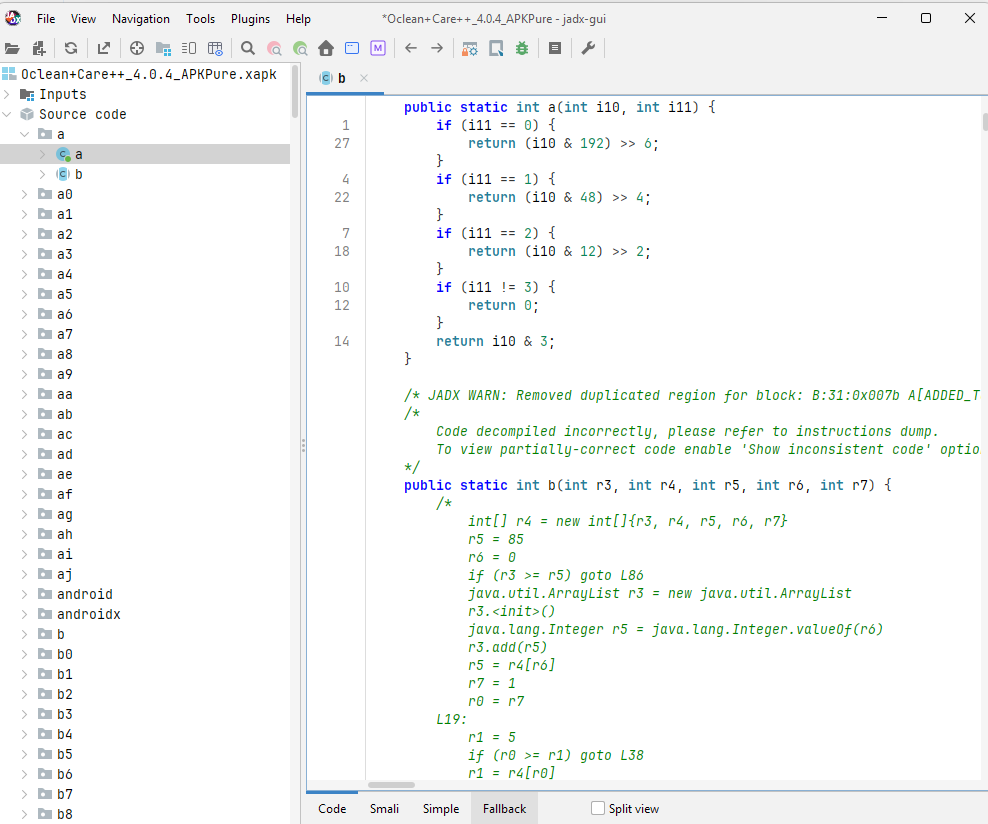
In most cases, however, this is just an effect of simple “minification” (compression) performed by standard Android build tools such as R8 (more details: https://developer.android.com/topic/performance/app-optimization/enable-app-optimization). The compression leaves the application logic intact and is usually not a serious obstacle to reverse-engineering, especially with agentic help, where you do not need to manually figure out and rename classes one by one.
After further inspection, the BLE functionality of our application seems to be in an included SDK library that was not compressed:
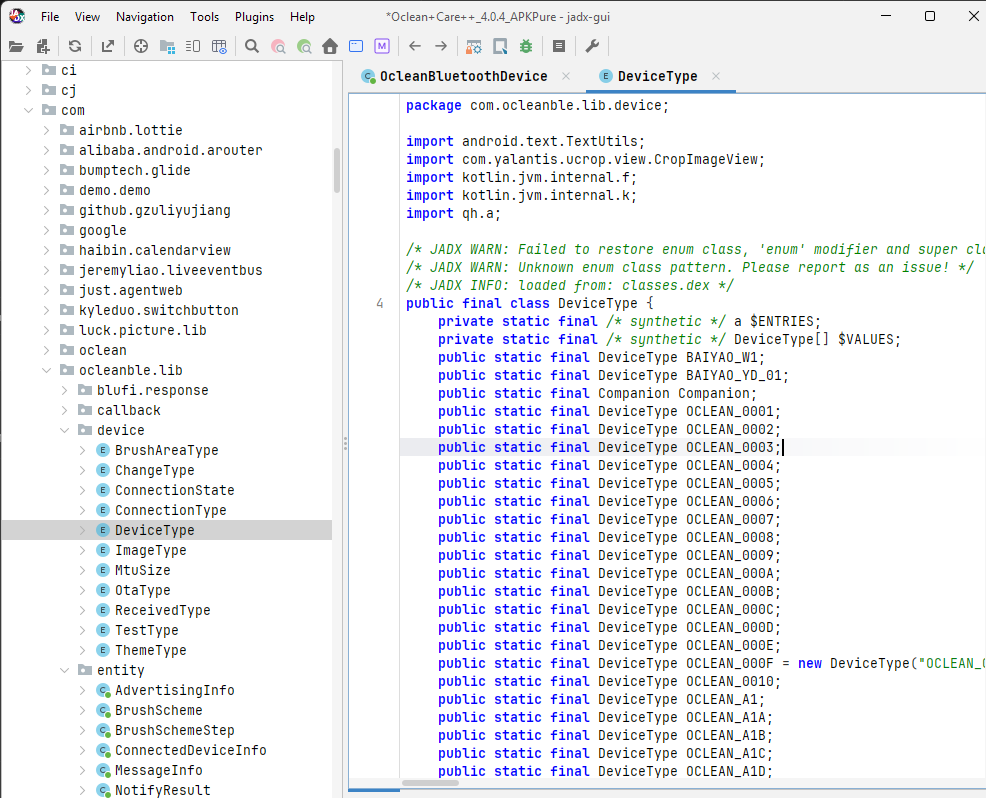
The decompiled Java code is not exactly the same as the original source and normally cannot be compiled back, but in most cases it is readable enough to understand the application flow.
In some applications that follow stricter protection, you may encounter deeper obfuscation that additionally performs control-flow manipulation and string encoding. In other cases, the interesting protocol logic might be embedded in a native C library or compressed React Native, Flutter, or Unity bundles, which require extra effort and additional tools such as Ghidra. Fortunately, this is rare for a typical BLE companion app, and it is not the case with our application either.
jadx-gui allows you to export the code (File -> Export project), optionally as a “Gradle project” Android app template, which may be helpful if you would like to load the code in Android Studio.
Ask AI for help
Simple, unobfuscated applications are usually relatively easy to understand after decompilation to Java. With the rise of AI tools, the days of manual reverse-engineering are most likely going to be forgotten.
Uploading the decompiled files (either as a zip or one by one) to your chat’s web UI is not really practical. It is better to grant access to the whole folder so that the agent can process the decompiled code. This can be achieved in multiple ways, for example from within Android Studio, Claude Code CLI, or Cursor IDE. Another option is to use the Model Context Protocol, which provides structured access to files and can even directly orchestrate the decompiler. By the way, the whole decompilation process can also be performed by agents, for example with a dedicated skill. It is not the most cost-effective option, though, so it is usually better to decompile manually. And if you want to save more tokens, point the agent to specific code fragments that cover BLE functionality.
In this example, we will use Cursor AI on a jadx-decompiled folder. Set the “New agent” to “Ask mode” and select the desired model, balancing output quality and cost. For our purpose, we will use Cursor’s own latest Composer 2.5, which currently offers good value for the tokens spent (by the time you read this, there will probably be a better one). Edit 1 week later: yes, the latest Grok 4.5 outperforms it.
The initial query:
explain how the application communicates with toothbrushes via BLE (advertising, gatt, …)
Result:
How this app talks to toothbrushes over BLE
The app uses a dedicated com.ocleanble.lib SDK, centered on OcleanBleManager. UI code (search, connect, settings, Wi‑Fi setup, OTA) calls that facade; the actual scan/connect/GATT/protocol work lives in obfuscated helper classes (j.*, g.*, i.*, z.*, I1111llI.*).
Architecture overview
    flowchart TB
    subgraph App
        UI[Activities / ViewModels]
        Svc[OcleanDataService]
    end

    subgraph SDK["com.ocleanble.lib"]
        Mgr[OcleanBleManager]
        Hub[j.g - event hub]
        Conn[i.e - connect client]
        Scan[I11111I1l - BLE scanner]
        Cmd[g.e / g.g - command protocol]
    end

    subgraph Android
        Adv[Toothbrush BLE advertising]
        GATT[BluetoothGatt + GattCallback j.h]
    end

    UI --> Mgr
    Svc --> Mgr
    Mgr --> Hub
    Hub --> Scan
    Hub --> Conn
    Conn --> GATT
    Scan --> Adv
    GATT --> Cmd
    Cmd --> Hub
After init, OcleanBleManager holds a j.g instance that:
- registers
OnOclean*Listenercallbacks (connection, battery, brush data, etc.) - owns the connect client (
i.e) - listens for Bluetooth adapter on/off
1. SDK initialization
Init goes through:
OcleanBleManager.Companion.options()
    .init(context, secretKey, authenticationCallback);
On construction (OcleanBleManager constructor):
- Optionally validates the app against
https://sdkauth.oclean.com(controlled by manifest meta-dataVALIDATE). - Creates
j.g, which registers aBluetoothAdapterstate receiver and the connect client. - If validation is enabled and fails, BLE stays disabled (
I11111Il = false).
Configurable options include scan period (default 15s), connect timeout (20s), auto-reconnect, connection priority (LOW_LATENCY / LOW_POWER / BALANCE), and MTU behavior.
2. BLE advertising & scanning
The toothbrush advertises passively; the phone scans—there is no app-side advertising.
Scan engine
- Class:
I11111I1l(“BLEScanClientImp2”) - API:
BluetoothLeScanner.startScan(filters, settings, callback) - Settings (
ScanSettings):setScanMode(2)→ LOW_LATENCYsetCallbackType(1)→ all matchessetReportDelay(0)→ immediate callbacks
- Default filter: empty
ScanFilter(scan everything nearby) - Timed scan: auto-stops after
scanPeriod(or runs forever withonStartScanAlways)
Entry points from the app:
| Method | Purpose |
|---|---|
onStartScan(listener) | Device discovery (add/bind flow) |
scanConnectionDevice(mac, …) | Scan by MAC then connect (reconnect path) |
onStopScan() | Stop active scan |
Parsing advertising data
Each result becomes an OcleanBluetoothDevice, which parses the raw scanRecord into AD elements (length/type/payload):… ```48:66:c:\dekompil\oclean_care\app\src\main\java\com\ocleanble\lib\entity\OcleanBluetoothDevice.java
synchronized (b.f3556a) {
map = new HashMap<>();
if (bArr != null && bArr.length > 1) {
int i11 = 0;
while (true) {
int i12 = bArr[i11] & 255;
if (i12 <= 0 || bArr.length <= i11 + i12 + 1) {
break;
}
int i13 = bArr[i11 + 1] & 255;
// …
map.put(Integer.valueOf(i13), bArr2);
Useful extracted fields:
- **`getRecordName()`** — AD type **0x09** (Complete Local Name)
- **`getRecordMac()`** — AD type **0xFF** (manufacturer data), interpreted as MAC bytes

`AdvertisingInfo` exists as a type/value pair model but is not heavily used in the visible app code; parsing is mainly in `OcleanBluetoothDevice`.

<h3>App-side filtering (what actually counts as “our brush”)</h3>

The SDK scan is broad; the **Search** UI filters in the ViewModel:

```58:72:c:\dekompil\oclean_care\app\src\main\java\com\yunding\noopsychebrushforeign\page\device\ui\search\s.java
    public final synchronized void onFoundDevice(OcleanBluetoothDevice device) {
        // ...
        String lowerCase = name.toLowerCase(locale);
        if (kotlin.text.o.x0(lowerCase, "oclean", false) || kotlin.text.o.x0(lowerCase, "crest", false) || kotlin.text.o.x0(lowerCase, "xtc", false)) {
            // exclude already-bound MACs, then publish to UI
        }
    }
When SDK validation is on, scan config can also load known device “face” names from a local SQLite deviceList table (I1111II1.I11111) and pass them into scan config (z.f), though the low-level match logic in z.c.onScanResult is not fully decompiled.
3. Connection flow (GATT client)
Starting a connection
connectionDevice(address, useMaxMtu)— direct GATT connect by known MACscanConnectionDevice(address, …)— scan withScanFilter.setDeviceAddress(mac), connect on first hit
Both queue work on a thread pool in i.b / i.a.
GATT connect parameters
        if (i10 >= 26) {
            BluetoothGatt bluetoothGattConnectGatt = device.connectGatt(context, false, hVar, 2, 1);
            // autoConnect=false, TRANSPORT_LE=2, PHY_LE_1M=1
        } else {
            BluetoothGatt bluetoothGattConnectGatt2 = device.connectGatt(context, false, hVar, 2);
        }
hVar is j.h, a BluetoothGattCallback.
Connection state machine
Defined in ConnectionState and driven by a0.d.run():
- CONNECT_START — wait for
onConnectionStateChange(STATE_CONNECTED) - DISCOVER_SERVICES —
discoverServices(), wait foronServicesDiscovered - CHANGE_MTU —
requestMtu(123)if max MTU requested, else 23 - CHECK_EQUIPMENT — read standard Device Information + battery characteristics
- COMPLETE — pick device-specific command handler, enable notifications, notify app
On disconnect, GATT is closed and ConnectedDeviceInfo is removed unless it was an intentional disconnect.
4. GATT services & characteristics
After service discovery, the app uses several GATT profiles.
Standard Device Information Service (`0000180a`)
Read during connect to identify the brush (h.b):
| UUID | Field |
|---|---|
00002A24 | Model number → DeviceType |
00002A26 | Firmware revision |
00002A27 | Hardware revision → protocol version bytes |
00002A28 | Software revision |
Battery Service (`0000180f`)
| UUID | Role |
|---|---|
00002A19 | Battery level — read at connect + notifications enabled |
Oclean proprietary service (`8082caa8-41a6-4021-91c6-56f9b954cc18`)
Defined in g.g (and variants for other models):
| UUID | Role |
|---|---|
9d84b9a3-000c-49d8-9183-855b673fbb85 | Main write channel (settings, sync, schemes) |
5f78df94-798c-46f5-990a-855b673fbb89 | Brush command write |
5f78df94-798c-46f5-990a-855b673fbb86 | Read/notify info |
5f78df94-798c-46f5-990a-855b673fbb90 | Brush data notify (live brushing telemetry) |
Notifications are enabled by writing CCCD 00002902-... via g.e.W():
    public final void W(UUID suuid, UUID cuuid) {
        BluetoothGattCharacteristic bluetoothGattCharacteristicQ = q(suuid, cuuid);
        if (bluetoothGattCharacteristicQ != null) {
            if (bluetoothGatt.setCharacteristicNotification(bluetoothGattCharacteristicQ, true)) {
                // write ENABLE_NOTIFICATION_VALUE or ENABLE_INDICATION_VALUE to descriptor
            }
        }
    }
Blufi Wi‑Fi provisioning (Wi‑Fi-capable models)
Used by classes like g.s, g.b0, g.n0, g.u0:
| UUID | Role |
|---|---|
0000ffff-... | Blufi service |
0000ff01-... | Write |
0000ff02-... | Notify |
OcleanBleManager.connectWifi(), startScanWifi(), etc. delegate to these handlers.
OTA (firmware upgrade)
During OTA, ConnectedDeviceInfo.isOTAUpgrade is true and GATT events route to o.c “otaHook” instead of normal commands. Dialog OTA (o.d) uses separate UUIDs, e.g. service 8082caa8-...cc34 (note cc34 vs normal cc18).
5. Command protocol (above GATT)
Each connected device gets a g.e subclass based on DeviceType (from model number + protocol), chosen in i.a.j(). There are dozens of variants (g.g, g.w0, g.s, g.b0, …) for different brush families.
Sending commands
High-level API examples on OcleanBleManager:
syncTime(),syncBrushScheme(),setVoice(),connectWifi(), etc.
These call methods on g.e, which build binary payloads with hex opcodes, e.g.:
0201— sync time0202— request device info0206/020B— brush scheme related0212,0213, … — various settings0303,0307— other control/info commands
Writes go through g.e.r() / s(), executed on a background executor by g.d:
writeCharacteristic()- Wait for
onCharacteristicWritesuccess (queuef10137n) - If expecting a reply, wait for notification (queue
f10138o) with timeout - Parse response in
g.g.v(uuid, bytes)and dispatch app events (battery, running state, brush data, etc.)
Payloads use little-endian ByteBuffer in most commands; MTU limits chunk size (MtuSize.DEFAULT=23, MAXIMUM=123).
Receiving live data
j.h.onCharacteristicChanged is the central notify handler:… ```29:71:c:\dekompil\oclean_care\app\src\main\java\j\h.java
public final void onCharacteristicChanged(BluetoothGatt gatt, BluetoothGattCharacteristic characteristic) {
// …
if (connectedDeviceInfo.isOTAUpgrade()) {
otaHook.g(gatt, characteristic);
} else {
command.v(uuid2, value); // parse opcode + dispatch listeners
}
}
Parsed events propagate through **`j.g`** to listeners registered on **`OcleanBleManager`** (`OnOcleanDataChangeListener`, `OnOcleanRunningChangeListener`, `OnOcleanBatteryChangeListener`, etc.).

---

<h2>6. How the main app uses this</h2>

| Layer | Role |
|-------|------|
| **`OcleanDataService`** | Long-running service; registers connection/mode/area listeners; syncs brush records, time, weather, etc. |
| **`/module_ble/*` routes** | ARouter screens: Search, Connect, Wi‑Fi add, OTA, voice, theme |
| **`ConnectDeviceActivity`** | Shows connect UI; calls `connectionDevice()` / `scanConnectionDevice()` |
| **`SearchDeviceViewModel` (`s`)** | Calls `onStartScan()`, filters discovered devices |
| **Feature screens** | Call `OcleanBleManager.getInstance()` for commands once connected |

Typical bind flow:
1. User opens **`/module_ble/Search`**
2. `onStartScan()` discovers brushes
3. User picks device → **`/module_ble/Connect`** with MAC
4. GATT connect + identify model → command handler attached
5. App syncs time/settings and keeps link via **`OcleanDataService`**

---

<h2>Summary</h2>

| BLE phase | What happens |
|-----------|----------------|
| **Advertising** | Brush broadcasts name + manufacturer data; app does not advertise |
| **Scanning** | `BluetoothLeScanner`, low-latency, usually unfiltered; app filters by name/MAC |
| **Connection** | GATT client, LE transport, optional MTU 123 |
| **GATT** | Standard DIS + battery + Oclean custom service (+ Blufi/OTA services when needed) |
| **Protocol** | Binary hex-opcode commands over write characteristics; responses via notifications |
| **Wi‑Fi / OTA** | Blufi over `0xFFFF` service; OTA hijacks GATT callback via `o.c` hooks |

Because much of the scan-filter and response-parsing code is decompiled incompletely (`z.c.onScanResult`, `g.g.v`), some opcode-to-feature mappings are inferred from write-side code and enum names rather than full receive handlers. If you want to go deeper on a specific part (e.g. live brushing telemetry opcodes, Blufi Wi‑Fi flow, or a particular `DeviceType`), say which area and we can trace it further.

</div>

The agent did a fairly good job of explaining the BLE communication protocol, from advertisement parsing to connecting and controlling. Perhaps our query was too broad, and the response included some details that were not actually very useful.

It seems that there is no authentication or encryption, and the only security the vendor implemented is gatekeeping access to a specific toothbrush by linking it to the user's online account. If we create our own application, we can connect to any device without an online account. This is probably not associated with any significant risk, although some settings could likely disrupt normal use. If the OTA firmware upgrade is not secured properly, a malicious update could even break the device permanently.

### Add live capture

A live capture from a real device greatly helps to match the static analysis with dynamic behavior. I manually connected to the device using BLESPloit, subscribed, and sent a sample command from the reverse-engineering output above to get device info. In the Capture History, I then had `adv.json` (advertising data), `ble.json` (services + characteristics), and a GATT log with the request and response.

### Optional previous version of the application

In many cases, especially if the code is obfuscated, it is worth looking at a previous version of the application. The communication protocol usually does not change very often, so there is a good chance it is mostly the same in an earlier version, which may be easier to decompile.

Unofficial stores such as [apkpure.com](https://apkpure.com) offer previous APK versions. For our application, the first available one is version 2.1.10, available [here](https://apkpure.com/oclean-care/com.yunding.noopsychebrushforeign/download/2.1.10).
<img src="../oclean_previous_version_apkpure.png" style="width: 60%; height: auto; display: block">

This version does not seem to have the same "minification," and all the classes and methods are visible in plain form:
<img src="../oclean_care_2_1_10_jadx.png" style="width: 100%; height: auto; display: block">

With the second app decompiled and the sample data available, the agent is now able to see more details:

> In the @src_2.1.10 there is an older version of the app that does not look like obfuscated. And in the @7028457F59CE_Oclean_Y3L there is a scan (advertisement + ble.json = services + characteristics) of a sample device

Result:

<div style="max-height: 500px; overflow-y: auto; padding: 1rem;
  border: 1px solid var(--color-border, #ccc); border-radius: 0.5rem;
  background: var(--color-surface)">... Good references — together they make the BLE stack much clearer than the obfuscated current build alone. Here is a consolidated picture using all three sources.

---

<h2>What changed between versions</h2>

| | **`src_2.1.10/`** (v2.1.10) | **Current app** (`src/main/`) |
|---|---|---|
| BLE code location | In-app: `YingBluetooth`, `BluetoothService`, `Statics`, `OrderUtils` | Extracted SDK: `com.ocleanble.lib` (`OcleanBleManager`, `g.g`, `j.h`, …) |
| Architecture | EventBus-driven monolith | Listener-based SDK + `OcleanDataService` |
| UUIDs / opcodes | Explicit in `Statics.java` | Same values, obfuscated class names |
| Scan filter | Name starts with `"oclean"` | Name contains `"oclean"`, `"crest"`, or `"xtc"` |

The protocol itself did not fundamentally change — it was refactored into a licensed SDK (`sdkauth.oclean.com` in the current build).

---

<h2>Real device: Oclean Y3L (`7028457F59CE_Oclean_Y3L/`)</h2>

**MAC:** `70:28:45:7F:59:CE`
**Display name:** `Oclean Y3L`
**Connectable, legacy ADV_IND, ~250 ms interval**

<h3>Advertising (decoded from `adv.json` / `ble.json`)</h3>

**Primary advertising PDU** (`02010411071bd790ece8b975800a4644d30104eda607ffce597f452870`):

| AD element | Type | Content |
|------------|------|---------|
| Flags | `0x01` | `0x04` — BLE only, no classic BT |
| 128-bit service UUID | `0x07` | **`a6ed0401-d344-460a-8075-b9e8ec90d71b`** |
| Manufacturer data | `0xFF` | Company ID `0x59CE`, payload `7f452870` (last 4 bytes of MAC reversed: `70:28:45:7F`) |

**Scan response** (`0b094f636c65616e2059334c`):

| AD element | Type | Content |
|------------|------|---------|
| Complete Local Name | `0x09` | **`Oclean Y3L`** |

Important: the main Oclean GATT service **`8082caa8-…-cc18` is not advertised**. Discovery relies on the **device name** in scan response (same as v2.1.10 filtering on `"oclean"`). The advertised `a6ed0401` service is a **secondary** protocol channel (see below).

After connect, GAP name (`2A00`) reads as **`Oclean_Y3L`** (`4f636c65616e5f59334c` in `ble.json`).

<h3>GATT table (from `ble.json`) — mapped to app usage</h3>

```mermaid
flowchart LR
    subgraph Adv["Advertising"]
        Name["Scan rsp: Oclean Y3L"]
        SvcAdv["Adv UUID: a6ed0401"]
        Mfg["Mfg data: MAC hint"]
    end

    subgraph GATT["After connect"]
        Oclean["8082caa8 … cc18\n(main app protocol)"]
        DG["a6ed0401 … d71b\n(DG framed protocol)"]
        DIS["180a Device Info"]
        Bat["180f Battery"]
    end

    App["OcleanBleManager / YingBluetooth"] --> Oclean
    App --> DIS
    App --> Bat
    Tool["s.a DG client"] -.-> DG
    Adv --> App
1. Generic Access (`1800`) + GAP name
- `2A00` = `"Oclean_Y3L"`2. Generic Attribute (`1801`)
- `2A05` Service Changed — indicate-capable (standard)3. **DG service** `a6ed0401-d344-460a-8075-b9e8ec90d71b` *(new on Y3L, not in v2.1.10 `Statics`)*
| Char UUID | Properties | Role |
|---|---|---|
a6ed0402-… | Notify (0x10) | TX / responses |
a6ed0403-… | Write no response (0x04) | RX / commands |
a6ed0404-… | Write no response (0x04) | Control |
In the current app this is implemented in s.a as a framed binary protocol (magic 0x4744 / 18244, opcode, length, payload, checksum) — separate from the hex-opcode Oclean protocol. It is advertised so tools/scanners can find it; the main brush UI still uses 8082caa8.
4. **Oclean main service** `8082caa8-41a6-4021-91c6-56f9b954cc18`
Same UUIDs as v2.1.10 Statics.java:
| Char UUID | Properties (Y3L) | App constant | Role |
|---|---|---|---|
5f78df94-…-bb86 | Notify + Write | OCLEAN_READ_INFO_UUID | Info notify + read |
9d84b9a3-…-bb85 | Read + Write | OCLEAN_WRITE_INFO_UUID | Main command write (0201, 0202, 0206, …) |
5f78df94-…-bb90 | Notify + Write | OCLEAN_RECEIVE_BRUSH_UUID | Live brush telemetry |
5f78df94-…-bb89 | Read + Write | OCLEAN_SEND_BRUSH_CMD_UUID | Brush control commands |
From v2.1.10 Statics.java:
    public static final UUID OCLEAN_SERVICE_UUID = UUID.fromString("8082caa8-41a6-4021-91c6-56f9b954cc18");
    public static final UUID OCLEAN_READ_INFO_UUID = UUID.fromString("5f78df94-798c-46f5-990a-855b673fbb86");
    public static final UUID OCLEAN_WRITE_INFO_UUID = UUID.fromString("9d84b9a3-000c-49d8-9183-855b673fbb85");
    public static final UUID OCLEAN_SEND_BRUSH_CMD_UUID = UUID.fromString("5f78df94-798c-46f5-990a-855b673fbb89");
    public static final UUID OCLEAN_RECEIVE_BRUSH_UUID = UUID.fromString("5f78df94-798c-46f5-990a-855b673fbb90");
5. Device Information (`180a`) — read at connect
| UUID | Field |
|---|---|
2A24 | Model number → DeviceType |
2A26 | Firmware revision |
2A27 | Hardware revision / protocol bytes |
2A28 | Software revision |
6. Battery (`180f`)
- `2A19` — notify + read; your capture shows **12%** (`0x0C`) in `gatt_*.log`End-to-end flow (confirmed across all three sources)
1. Scan / advertising
v2.1.10 — simple and readable:
        public void onLeScan(BluetoothDevice bluetoothDevice, int i, byte[] bArr) {
            if (bluetoothDevice != null) {
                String name = bluetoothDevice.getName();
                if (TextUtils.isEmpty(name) || !name.toLowerCase().startsWith("oclean")) {
                    return;
                }
                EventBus.getDefault().post(new SearshEventBus(SearshEventBus.STATUS_OK, bluetoothDevice));
Current app: same idea, broader name filter (oclean / crest / xtc), plus optional SQLite device-face list when SDK validation is on.
The Y3L capture confirms: name in scan response is the primary discovery key; manufacturer data carries a MAC hint; one 128-bit UUID is advertised (a6ed0401).
2. Connect + GATT setup
Both versions follow the same sequence:… 1. connectGatt(context, autoConnect=false, callback, TRANSPORT_LE)
2. Wait for connected
3. discoverServices()
4. requestMtu(123) → your Y3L log shows MTU 247 (ATT payload ≈ 244 bytes)
5. Read DIS characteristics (model, HW/FW/SW)
6. Enable notifications on battery + Oclean notify chars (write 0x2902 CCCD)
7. Instantiate device-specific command handler
8. Send init commands (time sync 0201, device info 0303, etc.)
v2.1.10 connect:
    public void connectDevice(String str) {
        // ...
        this.mBluetoothGatt = remoteDevice.connectGatt(this.mContext, false, this.gattCallback, 2, 1);
Current equivalent: i.a.i() → j.h callback → a0.d.run() state machine.
3. Command protocol (hex opcodes over `OCLEAN_WRITE_INFO`)
Commands are hex-string opcodes written to 9d84b9a3-…-bb85, with responses on notify characteristics. v2.1.10 documents these clearly in Statics / OrderUtils:
| Opcode | Meaning (from Statics) |
|---|---|
0201 | Set time (old) |
0202 | Clear/sync date |
0206 / 020B | Brush scheme |
0209 | Anti-splash mode |
020C | FFJ module |
020D | TX module |
020F | Brush head clean counter |
0211 | User info |
0212 | Pressure mode |
0213 | Bind module |
0216 | Language |
0217 | Brush head max life |
0301 / 0302 | Get device info |
0303 | Get battery |
0307 | Get date |
Write path (v2.1.10):
    public void sendOrder(String str) {
        writeBleCharacteristic(Statics.OCLEAN_SERVICE_UUID, Statics.OCLEAN_WRITE_INFO_UUID, StrUtils.hexStringToBytes(str));
    }
Current app: g.g.L() sends 0201 + GMT timestamp; g.d worker does write → wait for onCharacteristicWrite → wait for notify.
Live brushing data arrives on 5f78df94-…-bb90 (onCharacteristicChanged → ParseUtils in v2.1.10, g.g.v() in current SDK).
4. OTA (separate GATT profile)
v2.1.10 Statics also defines SPOTA/Dialog OTA UUIDs (0000fef5, 8082…cc34, etc.) — same as current o.d. During OTA, normal command routing is bypassed.
Practical summary for working with a Y3L
If you want to mimic the Oclean app:
- Scan for name
Oclean Y3L(or prefixOclean) - Connect by MAC
70:28:45:7F:59:CE - Discover services, request MTU ~123+
- Read
2A24/2A27/2A28to identify model/protocol - Enable notifications on
2A19,…bb86,…bb90 - Write hex commands to
9d84b9a3-…-bb85 - Parse notify payloads on
…bb86(command replies) and…bb90(brush sessions)
If you want the DG protocol (advertised UUID):
- Use service
a6ed0401, notify ona6ed0402, write framed packets toa6ed0403/a6ed0404pers.a(header0x4744, opcode, length, checksum)
The older src_2.1.10 tree is the best readable reference for opcodes and UUID constants; the Y3L capture is the ground truth for what a real Y3L exposes over the air and in GATT; the current obfuscated code is the same design with an SDK wrapper and extra device variants (Y3L’s a6ed0401 service, Blufi on Wi‑Fi models, etc.).
If useful next, I can decode a specific notify payload format (e.g. live brushing on …bb90) or map DeviceType.OCLEAN_Y3* entries to the handler class picked at connect time.
There are some minor mistakes — for example, it did not notice that the manufacturer-specific data does not follow the Bluetooth SIG specification, as there are no 2 bytes of manufacturer ID. It contains the full MAC address, not just the last 4 bytes. But overall, it looks good.
Command reference
Let’s also make a list of all possible commands for reference:
What are all the possible commands and settings that the app can use? How about changing sound, voice, …?
Note: we should probably be more specific from the start, as it would save iterations.
Result:
Transport (where to write)
| Characteristic | UUID suffix | Role |
|---|---|---|
bb85 OCLEAN_WRITE | 9d84b9a3-…bb85 | Main command channel — almost all 02xx / 03xx settings |
bb86 OCLEAN_READ | 5f78df94-…bb86 | Notify replies (subscribe before writes) |
bb89 OCLEAN_BRUSH_WRITE | 5f78df94-…bb89 | Brush history sync (0306 / 0307) |
bb90 OCLEAN_BRUSH_NOTIFY | 5f78df94-…bb90 | History chunks + live brushing telemetry |
| bb87 / bb88 | audio write / request | Older audio path (rare on Y3L) |
| 180f / 2a19 | standard | Battery (read; app also uses 0303 query) |
| fef5 SPOTA | separate service | Firmware OTA |
Pattern: write opcode (+ payload) to bb85 with response; read ack/data from bb86 notifications. History uses bb89 → bb90.
Queries (write to bb85 → reply on bb86)
| Opcode | Purpose |
|---|---|
0301 | Old device info (legacy brushes) |
0302 / 030201 | New device info (Y3L uses 030201, often 2 notify chunks) |
0303 | Battery level query |
0306 | Brush history sync (old protocol → bb89) |
0307 | Brush history sync (new protocol → bb89) |
0308 | W1 running-data header |
0309 | W1 device info |
030A–030D | Newer WiFi/smart models only |
0313–0316, 03A0, 0341 | Premium / WiFi / child models |
Settings — core (bb85 + payload)
From Statics.java and handler code:
| Opcode | App meaning | Payload (typical) |
|---|---|---|
0201 | Set device clock (old string format) | opcode + BCD/time string |
020E | Set device clock (new, 4-byte BE Unix) | opcode + 4 bytes |
0202 | Clear brushing history | opcode only |
0203 | Voice on/off + volume | +3 bytes (see Voice section) |
0204 | Clear audio/reminder flags | 02040100 voice, 02040001 remind |
0206 / 020B | Brushing scheme / plan | multi-byte plan; long plans split with 020B |
0207 | Voice pack / voice “language” type | +4 bytes BE int (e.g. 1 or 2) |
0209 | Running pattern / mode family | +1 byte (01 or EC on Y3) |
020C | “FFJ” module (anti-splash variant on some models) | +1 byte on/off |
020D | Running switch / timing mode (TX module) | +1 byte on/off |
020F | Reset brush-head wear counter | opcode only |
0210 | Music module | device-specific |
0211 | User / child profile | birthday/sex bytes |
0212 | Over-pressure protection | +1 byte on/off |
0213 | Binding / pairing success flag | +1 byte |
0214 | Weather sync | # + count + 4×weather records |
0215 | Points / gamification | opcode (+ payload on some models) |
0216 | UI language | +1 byte language ID (1–14) |
0217 | Brush-head max life (seconds) | +2 bytes BE |
0221 | Device theme | +1 byte theme ID |
0222 | Brush pause | +1 byte (01 pause, 00 resume) — not “start brush” |
0223 | Raise-to-wake | +1 byte on/off |
0224 | Fill-brush mode | +1 byte (some models only) |
0225 | Reminder / auto-mode family | +1 byte (model-dependent) |
0226 | Growth / base sync value | +2 bytes BE |
0227 | Clear growth increment | opcode only |
0228 | Prevent splash / festival remind | +1 byte (some models) |
0230 | Gyro / “over cross” sensor switch | +1 byte |
0238 | Spray module | 02381E open, 023800 close |
0239 | Remind switch (newer) | +1 byte |
0240 | Running switch (newer) | +1 byte |
0244 | Sync device voice pack (newer) | +1 byte |
02A0 | Counter / gamification model sync | +1 byte mode |
*F#* / *F# | Custom string messages | GB2312 text payloads |
0723 | Security / certificate negotiate | WiFi models |
There is no opcode in the app that remotely starts brushing. Brushing begins on the device; live session data arrives on bb90.
Voice, sound, and language (your main question)
1. Voice on/off + volume — `0203`
Built by OrderUtils.GetVoiceBaseOrder() and setDeviceVoice() → handler R() in g/a.java:
    public static byte[] GetVoiceBaseOrder(boolean z, int i, boolean z2) {
        byte[] bArrHexStringToBytes = StrUtils.hexStringToBytes(Statics.ACTION_SET_AUDIO_INFO);
return new byte[]{bArrHexStringToBytes[0], bArrHexStringToBytes[1], (byte) (!z ? 1 : 0), (byte) i, (byte) (!z2 ? 1 : 0)};| Byte | Meaning |
|---|---|
| 0–1 | 02 03 |
| 2 | Voice enabled: 0 = on, 1 = off (inverted vs UI boolean) |
| 3 | Volume level — SDK maps UI index 0–3 to 46, 52, 58, 62 (h.a.f10696a) |
| 4 | Base-voice flag (usually 1) |
Example: voice on, level 2 → roughly 0203003A01 (58 = 0x3A).
2. Voice pack / TTS type — `0207`
setDeviceVoiceLanguage() → 0207 + 4-byte big-endian int. Old UI used 1 vs 2 (standard vs “language model” voice).
3. UI language — `0216`
changeDeviceUILanguage() → 0216 + 1 byte:
| ID | Language |
|---|---|
| 1 | Chinese (Simplified) |
| 2 | Chinese (Traditional) |
| 3 | English |
| 4 | French |
| 5 | Japanese |
| 6 | German |
| 7 | Russian |
| 8 | Spanish |
| 9 | Italian |
| 10 | Hebrew |
| 11 | Turkish |
| 12 | Polish |
| 13 | Arabic |
| 14 | Korean |
Your Y3L capture had byte 32 = 0x03 (English) in the 030201 device-info block.
4. Clear voice/reminder state — `0204`
02040100— clear voice status02040001— clear reminder status
5. Voice reminders (3 toggles) — `0231`
setVoiceReminder() on newer handlers: 0231 + 3 on/off bytes.
6. Sync voice pack — `0244`
syncDeviceVoice() on WiFi/newer devices (g/n0.java).
7. Music (separate from voice prompts)
... | API / opcode | Purpose | |---|---| | `0210` | Child/music module | | `syncBrushSong`, `syncPlayMusic`, `syncMusicSwitch` | Play/sync music on supported models | | `setChildMusic`, `setChildMusicGroup`, etc. | Kids’ brushes |What you **read back** (from `030201`)
Y3 device-info layout:
| Byte(s) | Field |
|---|---|
| 5–8 | Voice type / pack id |
| 9 | Voice open (0 = on) |
| 10 | Volume raw byte |
| 11 | Calendar reminder on |
| 12–14 | Plan #, brush mode, strength |
| 15–16 | Current head-use seconds |
| 17–22 | Device clock |
| 23–24 | Pressure / reminder modes |
| 25 | Timezone index |
| 26–27 | Head max seconds |
| 28–31 | Head days / uses |
| 32 | UI language ID |
Other notable settings (Y3 / Y3L relevant)
| Setting | Opcode | Notes |
|---|---|---|
| Pause brushing | 0222 + flag | Ack like 0222004F4B (OK) |
| Over-pressure | 0212 + flag | |
| Raise wake | 0223 + flag | |
| Running / TX switch | 020D + flag | setRunningSwitch, setAreaRemind |
| Running pattern | 0209 + byte | setRunningPattern |
| Bind device | 0213 + flag | |
| User profile | 0211 + data | |
| Head life max | 0217 + uint16 BE | |
| Clear head wear | 020F | |
| Clear history | 0202 | |
| Theme | 0221 + id | |
| Weather | 0214 + payload | |
| Brushing plan | 0206 (+ 020B continuation) | syncRunningScheme, syncNursingPlan |
| Time sync | 0201 or 020E | calibrationTime() |
Brush history & live data (bb89 / bb90)
| Action | Write | Notify |
|---|---|---|
| Request history | 0306 or 0307 on bb89 | Chunks on bb90 |
| Live brushing | (no start command) | Telemetry on bb90 while brushing |
High-level SDK surface (`OcleanBleManager`)
The current app exposes 60+ BLE operations; not all work on Y3L. Grouped:
- Voice/audio:
setDeviceVoice,setDeviceVoiceLanguage,setVoiceReminder,syncDeviceVoice,readMusicInfo,syncBrushSong,syncPlayMusic, … - Language/UI:
changeDeviceUILanguage,syncDeviceUIData,startDeviceUIImages - Brushing:
setBrushPause,setRunningPattern,setRunningSwitch,setOverPressure,setPreventSplash,syncRunningScheme,readRunningData, … - Head/maintenance:
clearHeadData,setRunningHeadMaxTime,clearRunningDate - Time/user:
calibrationTime,setUserInfo,readDeviceTime - WiFi models:
connectWifi,startScanWifi,syncWifiNameLow, … - OTA:
otaUpgrade(SPOTA service) - Debug:
sendTestCommand(head, payload)
If the handler returns error 70 (command_info_0x46), that opcode is not implemented for your device type.
Y3L practical summary
For your Oclean Y3L over BLE, the settings that are clearly supported in captures and g/h.java:
| You want to… | Send on bb85 |
|---|---|
| Read status | Subscribe bb86, then 0303, 030201 |
| Set UI language | 0216 + lang byte (e.g. 021603 = English) |
| Voice on/off + volume | 0203 + 3 bytes |
| Voice pack type | 0207 + 4-byte BE int |
| Pause / resume | 022201 / 022200 |
| Sync time | 0201… or 020E… |
| Clear history | 0202 |
| Sync brushing plan | 0206… (possibly multi-packet) |
| Pull history | 0307 on bb89, subscribe bb90 |
Not on Y3L (or unconfirmed): remote brush start, WiFi provisioning, OTA over main service, many 03xx/02Axx/024x commands reserved for other models.
Example hex (after subscribing to bb86)
0303                          → battery reply on bb86
030201                        → device info (often 2× 0302 notifies)
021603                        → set language English
0203003A01                    → voice ON, volume level ~2 (0x3A=58)
020700000001                  → voice pack type 1
022201                        → pause ON
022200                        → pause OFF / resume
0202                          → clear brushing history
0307                          → on bb89: request history (bb90 notifies)
If you want, I can turn this into a BLEspoit menu (voice level picker, language list, pause/resume) — switch to Agent mode and say which commands to add first.
Create BLESPloit device library entry
With the command reference, we can proceed to create BLESPloit scripts for fingerprinting (“observer”) and extracting information (“central”) from the device. It is also useful to have a “peripheral” role for simulation and testing.
A simple device entry, for example one that just shows an icon based on advertising scan conditions, can be written manually with ease. But more complex entries (proprietary parsing, protocol logic, simulation, …) will require some Lua scripting, and this is much easier with agentic help.
The agent will work better with some context. Preferably, clone the device library repository and open it in the agent’s context. Referencing docs (schema, Lua conventions) will help the agent follow the specification correctly. The SKILL.md file from skills/blesploit-device-library-entry might be particularly useful in guiding the agent in the right direction. Copy it into your tool’s dedicated folder (e.g. .cursor/skills/blesploit-device-library-entry).
I used the following query to create the toothbrush device:
Use the blesploit-device-library-entry skill. @device-library/docs/device-manifest.schema.json @device-library/docs/lua-mobile.md @device-library/docs/lua-esp32.md. Based on the sample captures in @sample_devices and protocol reference in @commands.md create device entry with 3 roles: 1. observer that scans for matching devices based on advertising data and creates a fingerprint (to be matched by central script), 2. central “quick action” script that sends “get information” query to the device and parses it 3. peripheral that simulates the device and responds to the sample query just like original device (see sample @sample_devices)
As a result, a new device library entry was created. To test it, you can zip the folder and upload it to the device library manually (use the “down” arrow).
It worked only partially, and follow-up prompts were needed to:
- Adjust overly strict observer conditions that did not trigger the “quick action” script.
- Fix incorrect mobile app links.
- Apply small protocol tweaks after testing on real devices.
- Adjust naming and output.
- Improve simulation by supporting battery info and building a dynamic advertisement payload from the current simulated BDADDR.
- Add annotations and sample commands for the manual services browser.
- Replace the auto-generated icon and improve the graphics for simulation.
The number of required refinements indicates that the implementation was more complex than initially anticipated. Running the agent in plan mode first helps catch potential issues before they are coded. Also, iterating in smaller steps, for example one role at a time, might bring better results.
The resulting device entry is now part of the bundled device library. The observer detects the smart toothbrush based on advertising packets, and there is a “quick action” script that checks the device information (settings, language, brush usage, …):…
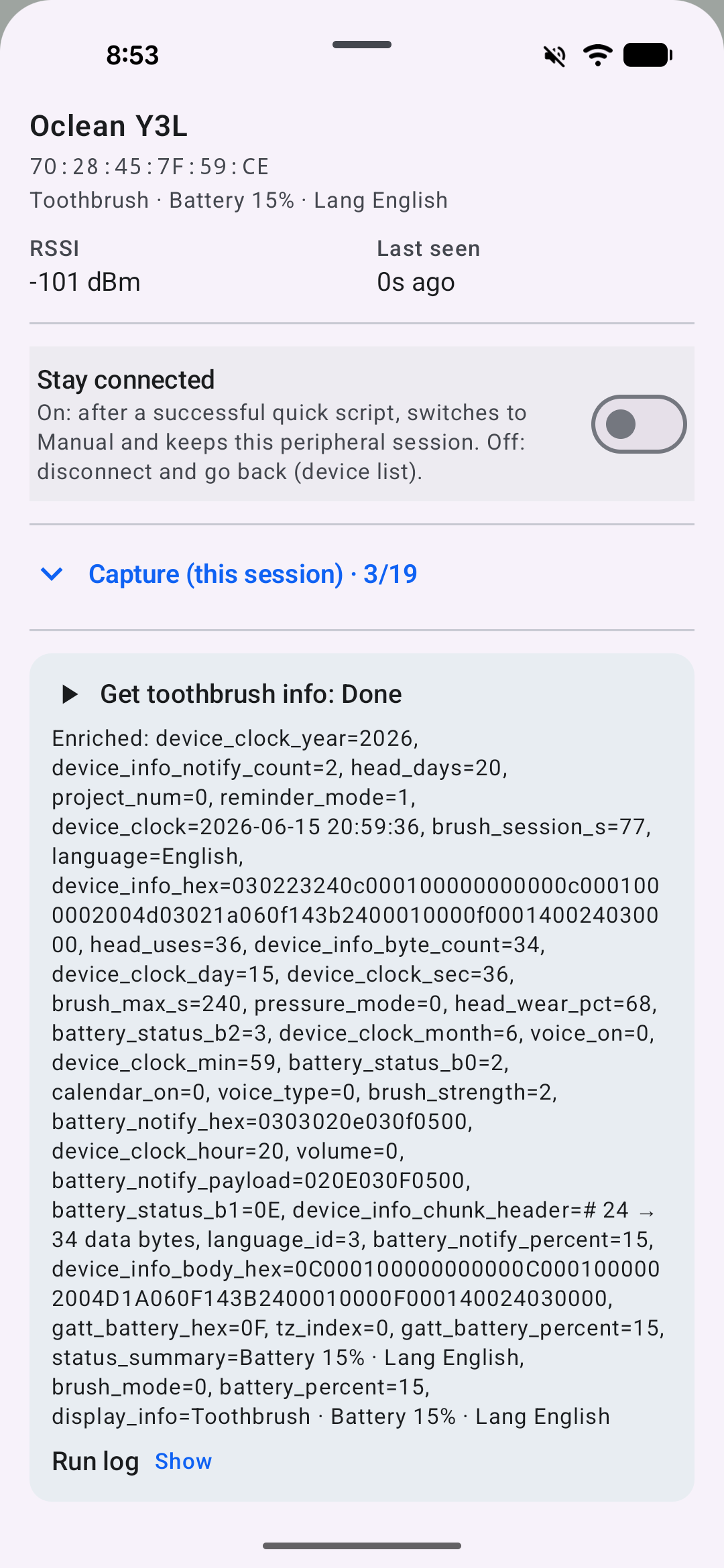
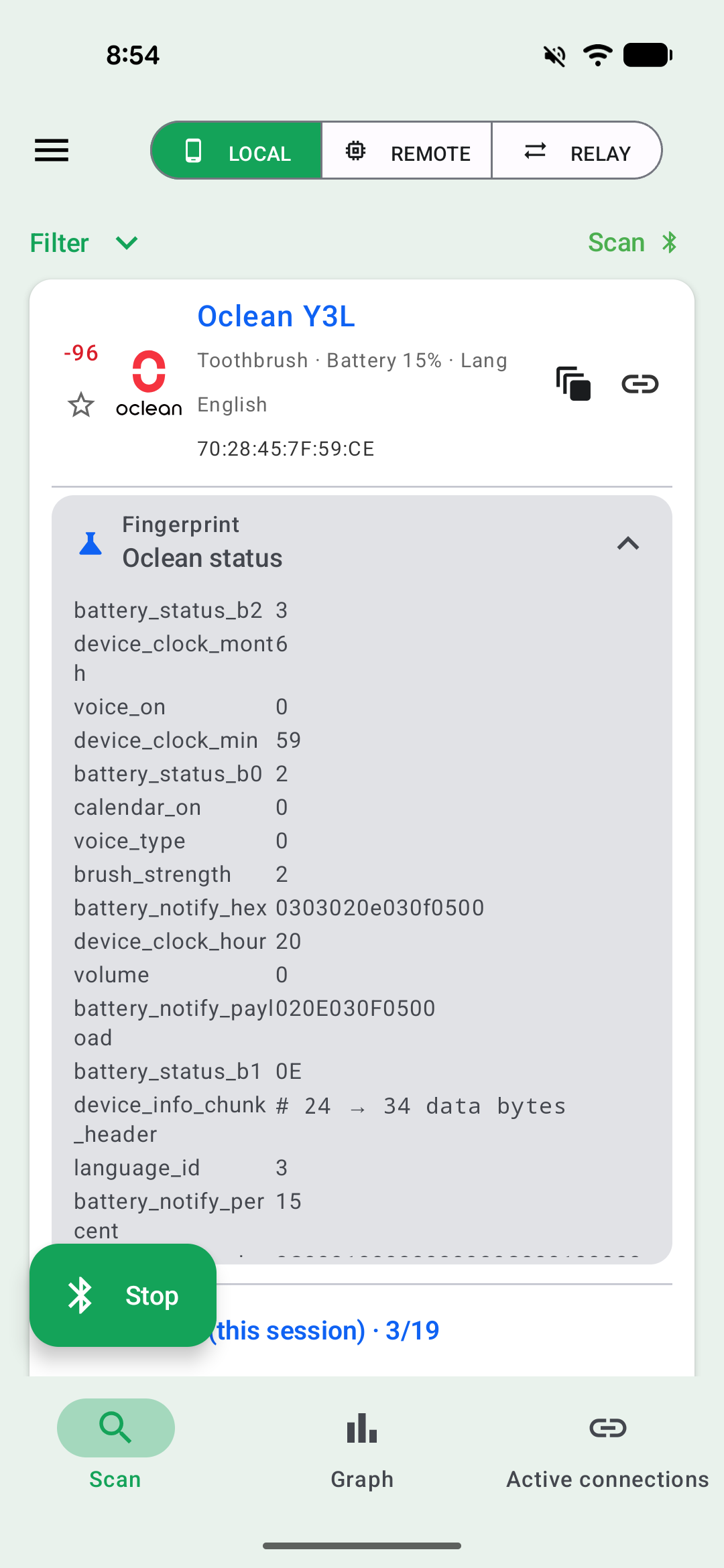
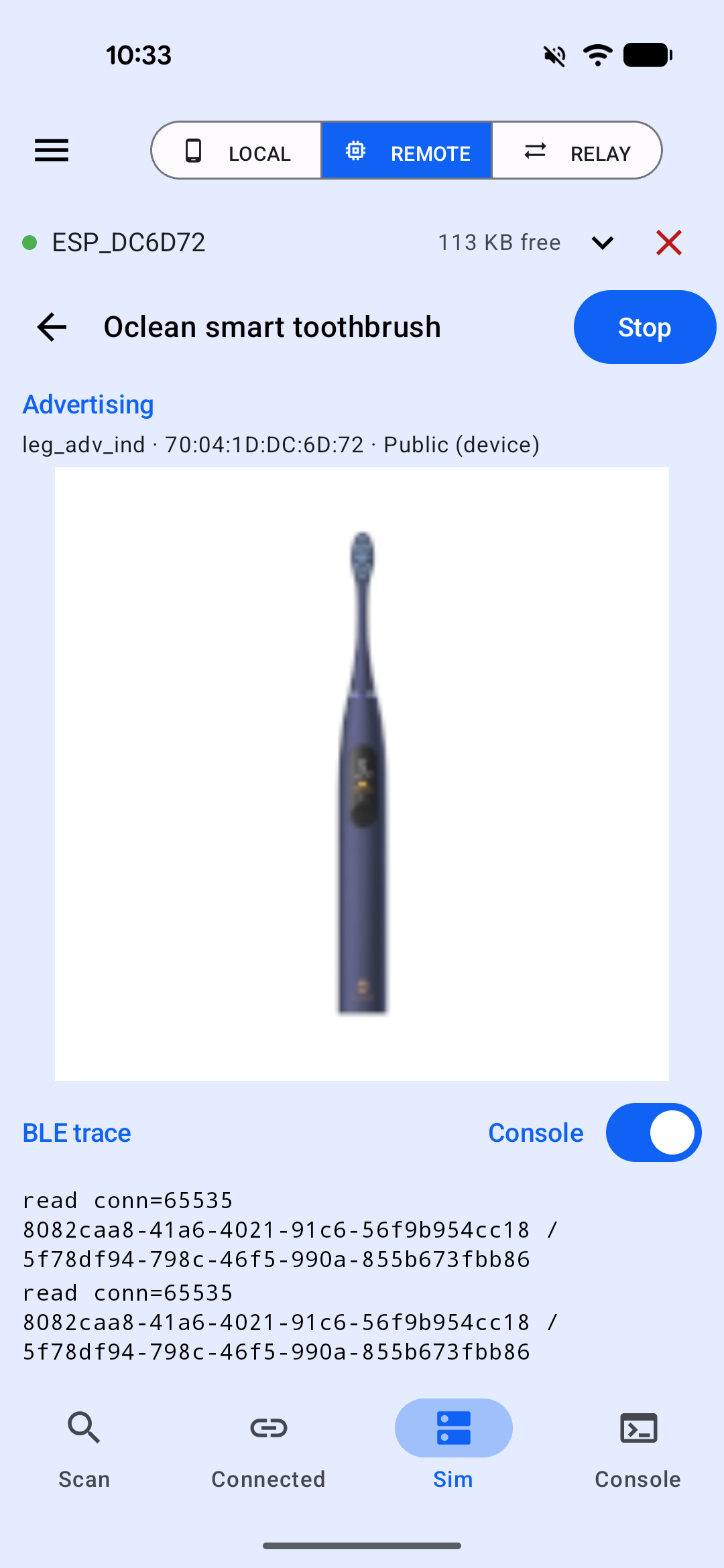
The script only reads the information and does not alter the settings. You can also simulate the toothbrush on ESP32 and try it yourself:
Is there a security risk?
It appears that the only security provided by the vendor is an association of specific device with the online account - which can be trivially bypassed if using the BLE communication protocol directly (or in case the user did not pair it with the application). But for a typical user the risk is probably low - just be aware that your dental habits may be retrievable by anyone within Bluetooth range. There is no way(?) to start brushing from the application, but a malicious actor could, for example, alter the settings or delete the brushing history. The devices seem to have an over-the-air firmware update feature which, if implemented improperly, could potentially be abused to break the device. I have not tested it, though.
Contact with the vendor
I tried to use the official application, but unfortunately I was not able to create a new user account — the email with the activation code never reached me (yes, I checked the spam folder, and I also tried various email providers). Based on multiple comments in the Play Store, I was not the only one with this problem:

The vendor’s support requested screenshots and then video recordings of the problem, which I submitted. They provided me with an activation code generated manually for my account, but it still did not work, and then another one which also did not work. They suggested that I had made a typo in my email address, even though it was correct in the video and screenshots. And repeatedly stated that “it works for us”:
Our R&D team has conducted multiple rounds of repeated inspections and tests. The device can connect to the App normally, and no abnormalities have been identified from the fault video you provided.
I informed them several times that, since I was unable to use their application, I reverse-engineered the Bluetooth communication protocol and created my own app. I did not receive any comment in response.
In the end, reverse-engineering the protocol and creating a BLESPloit script to communicate with the toothbrush took less time and caused less frustration than the unsuccessful attempts to register online using the official application.